
RFWEL
ForumWireless CommunicationWiMAXClearwire, Sprint 4GCLEAR Hub Express WiMax Modem
The RFWEL Forums are now archived. All threads and discussions are preserved here for reference. New posts, replies, and comments are no longer accepted. For support or enquiries, please visit our Knowledge Base or Contact Us.

CLEAR Hub Express WiMax Modem

This thread is part of the RFWEL Forums Archive. It is preserved here for reference and is no longer open for new replies or comments.
Pageof 1⌗ Filter ▾
T
thuor
Wireless Support
Join Date: Oct 2006
Posts: 395
01-31-2012, 10:34 AM
#1
The Clear Hub Express WiMax modem has an RP-SMA-female (Reverse Polarity SMA Jack) connector so you would just need to select the RP-SMA-Male (Plug) option in this kit: https://www.rfwel.com/shop/4G-USB-Mod...tenna-Kit.html. The most popular antenna in the kit is the 18dBi panel antenna and this works the best for most people.

Of course be sure to place the internal/external switch to the right setting.
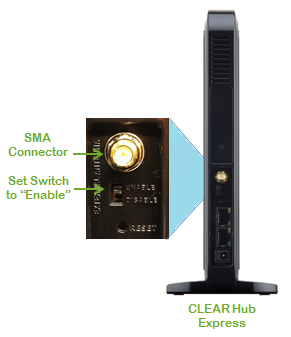


Alternatively, to hook up this antenna port to N-Male cable use an RP-SMA-Male/N-Female adapter. To hook up to other cable types use the appropriate adapter here: https://www.rfwel.com/signal_improvem...n_adapters.php. To find other Wimax antenna types such as table-top low-profile antennas go here: Wimax antennas
Tags: None
P
pooleds
New Member
Join Date: Aug 2012
Posts: 1
08-15-2012, 09:06 AM
#2
Since this modem has one antenna port, what sort of adapter would be necessary in order to attach 2 antennas?
Tags: None
T
thuor
Wireless Support
Join Date: Oct 2006
Posts: 395
08-15-2012, 11:14 AM
#3
Sadly you cannot split this into two.
Tags: None
U
udaman
New Member
Join Date: Aug 2012
Posts: 6
08-30-2012, 10:39 AM
#4
Originally posted by thuor
Sadly you cannot split this into two.
... yes but,

nino riff has a utube vid that shows how easy it is to open up the HE, to locate the 3 antenna tabs on the logic board. Could connect 2 external antenna fairly easily if one wanted, no? Voids warranty, but they are selling these things cheap right now.

According to nino, you can do a simple 'mod' buy placing the pigtail of the rp-sma connector port on the HE, onto the logic board 'ant 2' tab, which is claimed is a 'always' connected/enabled, vs the other tabs which are controlled by the external disable/enable switch you show in your post. That if you have the internal omni antenna and external antenna connected, that you'll see less strong signal; than if you only had an external antenna connected.

my guess is your answer is that it depends.
Tags: None
T
thuor
Wireless Support
Join Date: Oct 2006
Posts: 395
08-30-2012, 03:20 PM
#5
You are exactly right - thanks for clarifying my answer. If you are opening up the case and attaching external antennas directly to the antenna posts then yes you can attach two antennas. I think pooleds was asking about somehow "splitting" the single external antenna port (that is outside the case) to allow attachment of two antennas to it which you clearly cannot do.
Tags: None
U
udaman
New Member
Join Date: Aug 2012
Posts: 6
08-31-2012, 04:30 PM
#6
Originally posted by udaman
That if you have the internal omni antenna and external antenna connected, that you'll see less strong signal; [BOLD]than if you only had an external antenna connected.[/BOLD]

my guess is your answer is that it depends.
hope this is the case, otherwise the 18dbi FP antenna I got from you guys is terrible/nearly useless in my application. I'm getting no increase in signal strength using this antenna (LMR400 cable connected)...or something else is amiss??? Thinking I should just open up the modem to see if the internal pigtail from external port to logic board is not securely connected/loose???

maybe I need a better omni external? doesn't seem likely when considering the tests I did in the area while driving around close to two of the towers with the modem in my car.
Tags: None
T
thuor
Wireless Support
Join Date: Oct 2006
Posts: 395
09-01-2012, 07:18 PM
#7
ok so just to clarify you just have the external antenna connected with the int/ext switch correctly set and you don't see any improvement vs having no external antenna? Is the antenna placed outdoors? Do you see an improvement when you use the modem outdoors without an external antenna?
Tags: None
T
Tommy_Roberson
New Member
Join Date: Apr 2012
Posts: 5
09-07-2012, 11:50 AM
#8
Originally posted by udaman
hope this is the case, otherwise the 18dbi FP antenna I got from you guys is terrible/nearly useless in my application. I'm getting no increase in signal strength using this antenna (LMR400 cable connected)...or something else is amiss??? Thinking I should just open up the modem to see if the internal pigtail from external port to logic board is not securely connected/loose???

maybe I need a better omni external? doesn't seem likely when considering the tests I did in the area while driving around close to two of the towers with the modem in my car.
I don't know if this helps or not, but in my un-professional tests, I see an improvement with the 18dbi antenna even if I'm right next to the tower. My signal strength and performance is usually better.
Tags: None
P
Petro5
Join Date:
Posts: 0
09-07-2012, 12:41 PM
#9
Just curious what modem are you using? But this is typically the case that the 18dBi panel rarely disappoints. In fact we always strongly recommend the 18dBi because it seems to by far outperform any of the other antennas that can be used for the kit. Even the 24dBi Grid does not work as well (even after we reduced the bandwidth to cover just the 2.5-2.7GHz band vs original grids that went all the way down to 2.4GHz).
Tags: None