
RFWEL
⌂›Forum›Wireless Communication›Link Aggregation/ Load Balancing -- Multi WAN Routers›how to confing inbound load balancing connection for a server
The RFWEL Forums are now archived. All threads and discussions are preserved here for reference. New posts, replies, and comments are no longer accepted. For support or enquiries, please visit our Knowledge Base or Contact Us.

how to confing inbound load balancing connection for a server

This thread is part of the RFWEL Forums Archive. It is preserved here for reference and is no longer open for new replies or comments.
⌕
Pageof 1‹›⌗ Filter ▾
G
gunnm
New Member
Join Date: Aug 2009
Posts: 1
10-22-2009, 06:53 PM
#1

Hi,

I have a peplink balance 310 and two ADSL connections (wan1 and wan2) the two connections are equal in download and upload (2M down, 1M up).
The wan1 is with static external IP, in drop-in-mod.
The wan2 is with dynamic external IP, on DHCP mod.

I configured a rule (like I see in the video) to make and load balancing connection in outbound policy.
I configured my server IP in inbound policy.
I do not add services.
I config default connection priority in DNS setting and add my domains names.

I have two ADSL modem connected to my peplink and one server and one PC.

What I need: make my server to connect and be listened by the two connections (wan1 and wan2 and maybe wan3 in next time)

My problem: is when I disconnect my wan1 connection (to test the load balancing connection), my server do not connect on wan2 all connections to my server are down and I can't connect to my server from out side, but my PC still connected.

I make a Peplink Balance Broadband Speed Test and I find that my speed down load are doubled (around 3.5 to 3.8M) so I deduced that my two connections are combined!

So my question is: what I do wrong when I config my Load Distribution Weight rule to make my server all ways on? and if it's possible, how must I config my peplink to make my server all ways on?

P.S: I buy a Round Robin DNS Host option from no-ip.com to make my domains names up date a two IPs connections (DNS Host (Round Robin): This maps your hostname to multiple IP address. Only used for DNS based load balancing) here is an example of noip2 -S command on my Debian server:

umbrella:~# noip2 -S
1 noip2 process active.

Process 2752, started as noip2, (version 2.1.7)
Using configuration from /var/lib/noip2/noip2.conf
Last IP Address set ***.***.***.***
Account **********@****.****
configured for:
host  **************@SERVER-1
host  **************@SERVER-2
host  **************@SERVER-1
host  **************@SERVER-2
host  **************@SERVER-1
host  **************@SERVER-2
updating every 120 minutes via /dev/eth0 with NAT enabled.

umbrella:~#

and here an example of nslookup command:

umbrella:~# nslookup umbrella1.no-ip.biz
Server:         192.168.1.1
Address:        192.168.1.1#53

Non-authoritative answer:
Name:   umbrella1.no-ip.biz
Address: ***.***.***.***
Name:   umbrella1.no-ip.biz
Address: ***.***.***.***

umbrella:~#

Thanks for your help.
Tags: None
C
chiti
New Member
Join Date: Dec 2006
Posts: 22
10-23-2009, 12:29 AM
#2

maybe this is a dumb question but are you sure you have correctly setup your health check DNS servers under WAN1 profile?

Tags: None
T
thuor
Wireless Support
Join Date: Oct 2006
Posts: 395
11-10-2009, 01:13 PM
#3

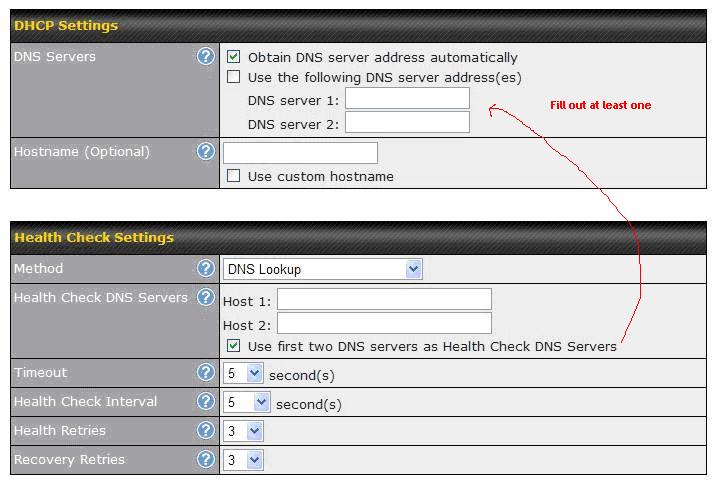
Actually one of the common thing we have seen is just this. If you are using DNS lookup for health check and you don't set your health check dns servers in the WAN1 page instead relying on the checkbox "Use first two DNS servers as Health Check DNS Servers" and where in the IP settings you are not setting a DNS server either instead relying on it being sent automatically.

Do let us know if you have resolved this problem and if it was something other than the above in case other people run into the same issue.

Tags: None
T
thuor
Wireless Support
Join Date: Oct 2006
Posts: 395
11-10-2009, 04:49 PM
#4

... also if using DHCP for WAN1 be sure to setup either DNS server in the DHCP settings if you check the option to "Use first two DNS servers as health check DNS servers" in the health check tab

Pepwave DNS health check settings

Tags: None
J
jaccc
New Member
Join Date: Dec 2009
Posts: 1
12-28-2009, 02:28 AM
#5

how to confing inbound load balancing connection for a server

(commonly referred to as dual-WAN routing or multihoming) is the ability to balance traffic across two WAN links without using complex routing protocols like BGP (Border Gateway Protocol).

This capability balances network sessions like web, email, etc over multiple connections in order to spread out the amount of bandwidth used by each LAN user, thus increasing the total amount of bandwidth available. Example: A user has a single WAN connection to the Internet operating at 1.5Mbit/s. They wish to add a second broadband (Cable, DSL, Wireless) connection operating at 2.5Mbit/s. This would provide them with a total of 4Mbit/s of bandwidth when balancing sessions.

Session balancing does just that, it balances sessions across each WAN link. When web browsers connect to the Internet, they commonly open multiple sessions, one for the text, another for an image, another for another image, etc. Each of these sessions can be balanced across the available connections. An FTP application only uses a single session so it is not balanced, however if a secondary FTP connection is made, then it may be balanced so that on the whole traffic is evenly distributed across the various connections and thus provides an overall increase in throughput.

Additionally, network load balancing is commonly used to provide network redundancy so that in the event of a WAN link outage, access to network resources is still available via the secondary link(s). Redundancy is a key requirement for Business Continuity plans and generally used in conjunction with critical applications like VPN's, VoIP.

Finally, most network load balancing systems also incorporate the ability to balance both outbound AND inbound traffic. Inbound load balancing is generally performed via dynamic DNS which can either be built into the system, or provided by an external service. Having the dynamic DNS service within the system is generally thought to be better from a cost savings and overall control point of view.

thanks

_______________________

Tweak Windows 7 instantly and without logging off

Tags: None