
RFWEL
ForumHVAC Wireless ControlsWireless ThermostatsVenstar T1800 7-day Programmable Thermostat
The RFWEL Forums are now archived. All threads and discussions are preserved here for reference. New posts, replies, and comments are no longer accepted. For support or enquiries, please visit our Knowledge Base or Contact Us.

Venstar T1800 7-day Programmable Thermostat

This thread is part of the RFWEL Forums Archive. It is preserved here for reference and is no longer open for new replies or comments.
Pageof 1⌗ Filter ▾
J
JustusL
New Member
Join Date: Nov 2019
Posts: 3
11-19-2019, 12:01 PM
#1

I have two TSTATCCPS701 carrier Programmable Thermostats, one in downstairs and another upstairs for my heat pump system. I replaced the two TSTATCCPS701 with T1800 Venstar thermostat (https://shop.rfwel.com/venstar-t1800...hermostat.html) which look identical. The wiring is also identical (see photos) except that the TSTATCCPS701 carrier thermostats do not have jumpers. With the jumpers set according to the diagram in the manual page 5.4 (https://wdi.rfwel.com/cdn/techdocs/T...stallation.pdf) I set the temperature down 10 degrees for cooling (it's was a warm day) and got no response. Both the air handler fan and the heat pump did not come on. So I switched the J1 jumper to the upper two pins and that got the air handler to come on, but the heat pump still did not come on. Any ideas on this?
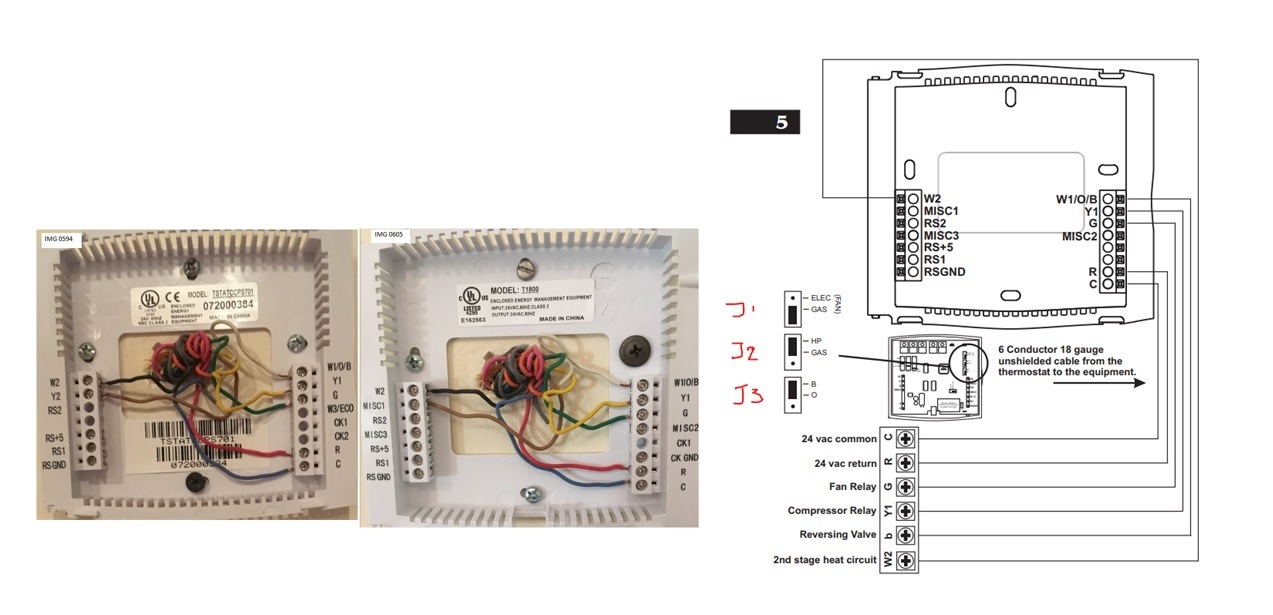
Venstar-T1800-TSTATCCPS701

Tags: None
Guest
Guest
Join Date:
Posts: 0
11-19-2019, 03:18 PM
#2

Venstar T1800 and Carrier TSTATCCPS701 programmable thermostats indeed are wired in the same manner. However, Slimline T1800 Thermostats by Venstar have 3 configurable outputs (MISC1, MISC2, MISC3) for flexibility. The wiring setup is okay. All that is needed is to activate the relevant operation mode of the Thermostat with respect to the Heat pump system. To achieve this, program the HP setting on the thermostat by pressing the MODE and PROGRAM or MODE and FAN buttons to enter advanced setup. Then press the MODE button repeatedly until HP appears in the middle of the screen. Press the UP button so that ON is displayed. Press PROGRAM or MODE and FAN to exit advanced setup. This is further described on page 4.3 in the owner's manual.

Tags: None
J
JustusL
New Member
Join Date: Nov 2019
Posts: 3
12-06-2019, 04:25 AM
#3

This was helpful indeed. Thermostat is now in full function and working beautifully.

Tags: None