
RFWEL
ForumHVAC Wireless ControlsWireless Remote ControllersProgramming Advanced Mitsubishi Electric Remote Controller (SG15H)
The RFWEL Forums are now archived. All threads and discussions are preserved here for reference. New posts, replies, and comments are no longer accepted. For support or enquiries, please visit our Knowledge Base or Contact Us.

Programming Advanced Mitsubishi Electric Remote Controller (SG15H)

This thread is part of the RFWEL Forums Archive. It is preserved here for reference and is no longer open for new replies or comments.
Pageof 1⌗ Filter ▾
I
Idris1
New Member
Join Date: Sep 2021
Posts: 2
09-09-2021, 11:29 AM
#1

I just got a Mitsubishi Electric SG15H (E22T43426) remote controller for my Mitsubishi system unit (link). It worked automatically after inserting the batteries. I have seen a weekly timer feature but I am unable to program this. How is this done?
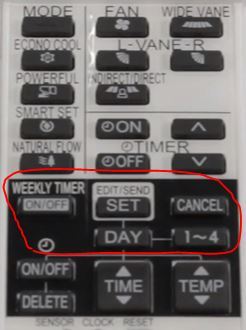
SG15H Programming

Tags: None
L
Lameck
Wireless Guru
Join Date: Apr 2020
Posts: 65
09-13-2021, 10:51 AM
#2

To be able to program your remote, proceed as below.

  1. Press SET to enter the weekly timer setting mode.
  2. Press the DAY button and press 1-4 to select setting day and number
  3. Press ON-OFF then TIME and TEMP to set ON/OFF, time, and temperature
  4. Press SET to complete and transmit the weekly timer setting
  5. Press the WEEKLY TIMER (ON/OFF) button to turn the weekly timer ON.

It is important to note that the saved settings will not be cleared when the weekly timer is turned OFF.

Find other handheld remote controllers here.

Last edited by Lameck; 09-13-2021, 11:10 AM.

Tags: None