The RFWEL Forums are now archived. All threads and discussions are preserved here for reference. New posts, replies, and comments are no longer accepted. For support or enquiries, please visit our Knowledge Base or Contact Us.
Mitsubishi Wireless Interface 2 (PAC-USWHS002-WF-2) Communication Problem with Wi-Fi
This thread is part of the RFWEL Forums Archive. It is preserved here for reference and is no longer open for new replies or comments.
⌕
Pageof 1‹›⌗ Filter ▾
F
Flint
New Member
Join Date: Jan 2021
Posts: 1
01-15-2021, 06:43 AM
#1
My Mitsubishi Wireless Interface (PAC-USWHS002-WF-2 https://shop.rfwel.com/mitsubishi-el...ace-control-2/) unit does not communicate with the Wi-Fi router. I have tried out everything including installing a new router but I still get an error message that Kumo Cloud does not connect to the router. Please help me out.
Tags: None
L
Lameck
Wireless Guru
Join Date: Apr 2020
Posts: 65
01-15-2021, 10:32 AM
#2
Mitsubishi PAC-USWHS002-WF-2 Wireless Interface is only compatible with 2.4 GHz b/ g/ n protocols Wi-Fi networks. It cannot be used with 2.4GHz & 5GHz mesh networks. The router you are using should be able to support 2.4 GHz and b/g/n protocols. So Wi-Fi 5 (802.11ac) or Wi-Fi 6 (802.11ax) or Wi-Fi 6E (802.11ax at 6 GHz) will not work. Please confirm the frequency band supported by your router. Alternatively, contact us for compatibility questions or router selection.
In case your router supports 2.4 GHz frequency only, please attempt setting up your wireless interface using the following steps (if you encounter specific errors, please let us know or share images of the same):
1. Power down all systems 2. Connect a Mitsubishi Electric Wireless Interface to the CN105 connector on each indoor unitCN105 connector 3. Power up all systems 4. Four quick, blue flashes indicate Bluetooth LE configuration mode. The interface is ready to connect using the app. Three slow, blue flashes repeat after the Connection is complete. 5. Turn on Bluetooth in phone/tablet settings 6. Log into the 2.4 GHz WiFi network only, if previously logged in to the 5 GHz network, go into your WiFi settings and forget this network 7. Download Kumo Cloud App from the App Store, Google Play, or Amazon and install 8. Create an account using your email and create a password
N/B: Factory reset of PAC-USWHS002-WF-2 devices manufactured before June 2022 will prevent setup via Android 12+.
Note that the installation should be conducted by a professional installer to avoid any damage or injury. Contact our Rfwel HVAC experts for guidance on the installation or other technical assistance.
05-25-2022, 12:31 PM
Tags: None
C
chemicaldan
New Member
Join Date: Jan 2022
Posts: 1
01-25-2022, 06:32 PM
#3
I am also having a similar issue. I followed these steps however I get to the screen that says finding zones, and it can't find any of my zones. Not sure what I should do next.

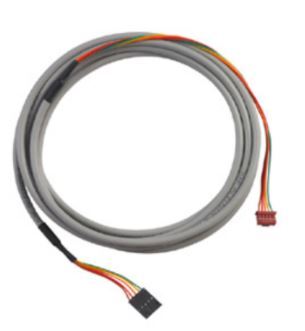 CN105 connector 3. Power up all systems 4. Four quick, blue flashes indicate Bluetooth LE configuration mode. The interface is ready to connect using the app. Three slow, blue flashes repeat after the Connection is complete. 5. Turn on Bluetooth in phone/tablet settings 6. Log into the 2.4 GHz WiFi network only, if previously logged in to the 5 GHz network, go into your WiFi settings and forget this network 7. Download Kumo Cloud App from the